PRODUCTS
All productsDOSETIMESSTOCKCAREFAMILY

Android app · Free

Never forget a dose. Never run out of a medicine.

Q DOSE reminds you of every dose on time and tracks your medicine stock and health measurements, for you and your family. Everything stays on your phone, works offline and needs no account.

Download for AndroidVersion 1.0.0 · 60 MB · APK file · Android 7.0+
Coming soon to
  • iPhone
  • Windows
  • Google Play
Price
Free
Ads
None
Internet
Not needed
Languages
3
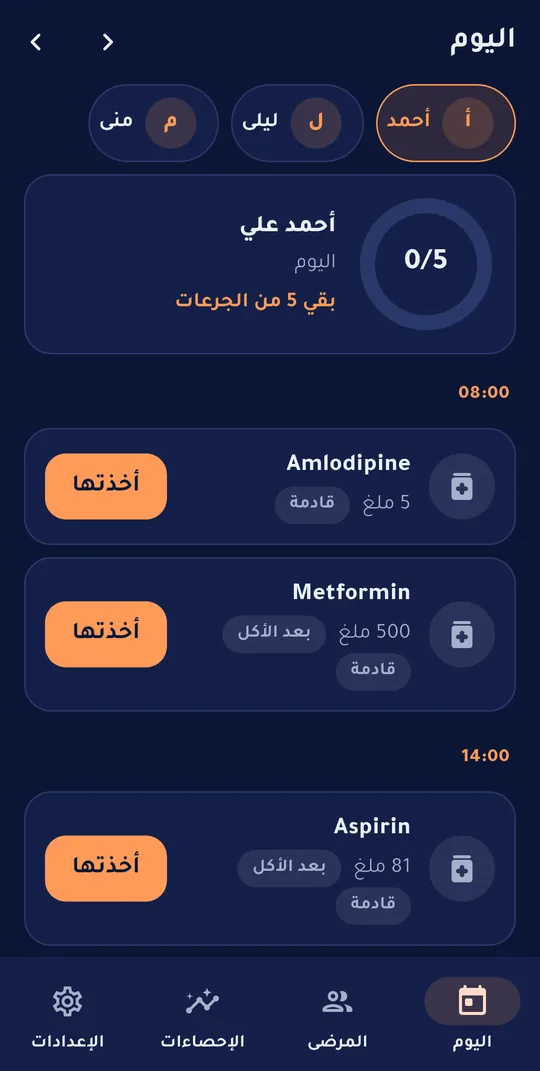
The Today screen in Q DOSE: today’s doses and their status

Inside the app

Real screens from Q DOSE on an Android phone (fictional data).

Your medicine day on one screen

Open the app and see what is due, what you missed and what is left.

  • A progress ring for the doses you took today
  • Every dose has a status: upcoming, due, overdue, missed, taken
  • Log a dose with a tap, with instant Undo if you slip
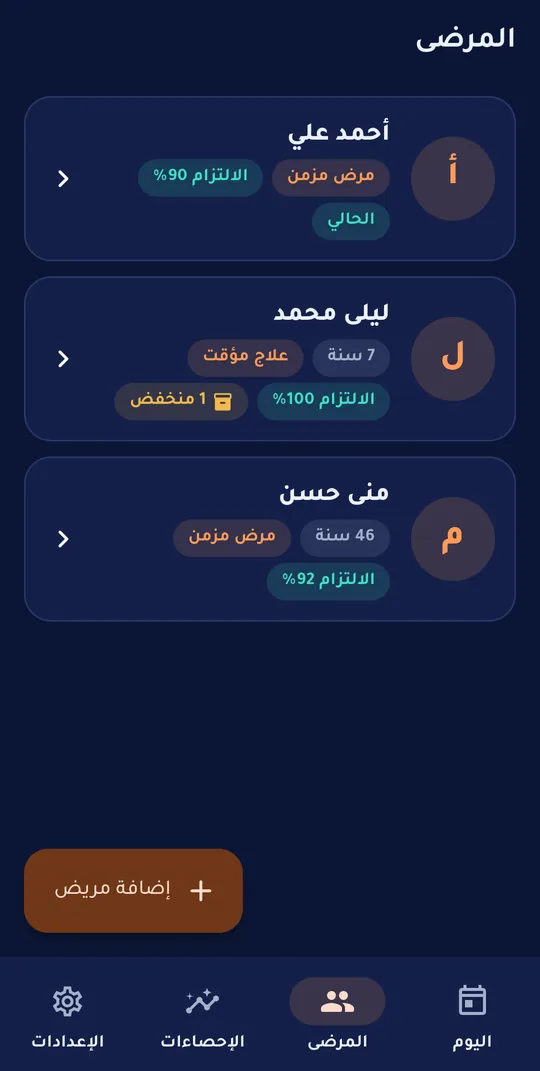
  • One patient or several (you and your family) with a quick switch
  • Light and dark themes
Today’s doses grouped by time with a “Taken” button
Patients: family members and each one’s adherence

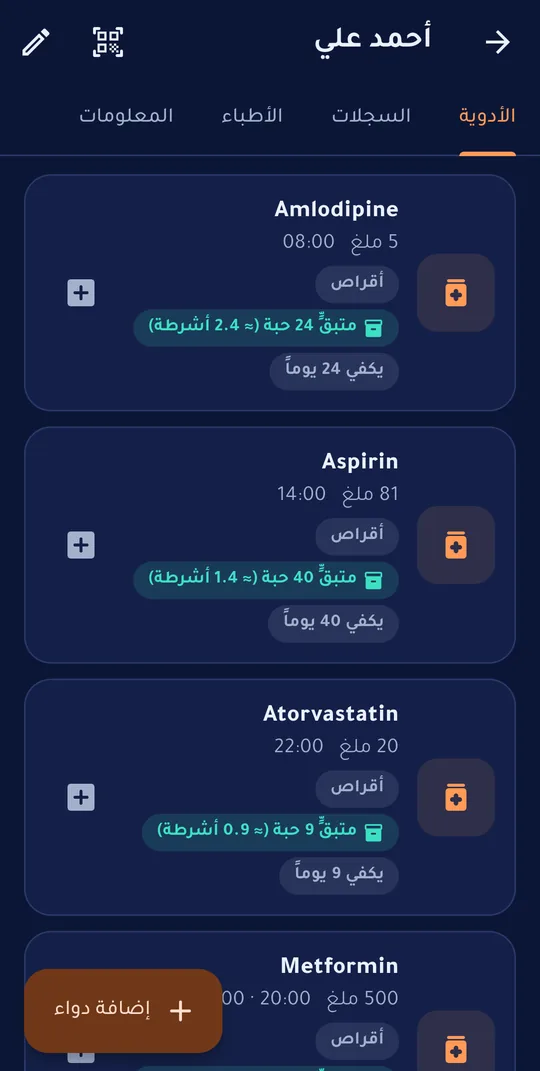
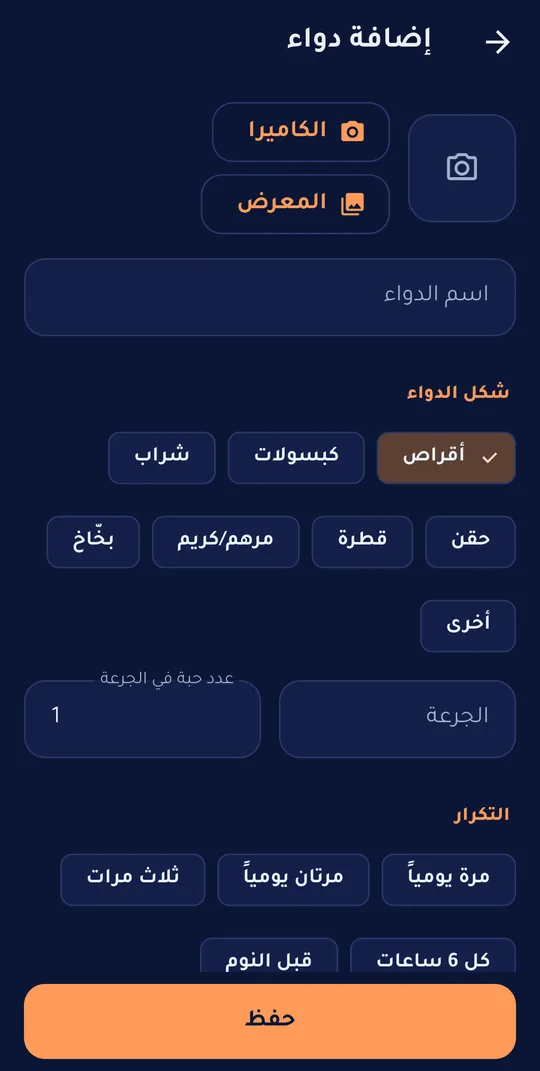
Medicines, in full detail

Tablets, syrup, injections or drops — each form with its own unit and pack.

  • Form: tablets, capsules, syrup, injections, drops, cream, inhaler
  • Pack size: tablets per strip or ml per bottle, with the remaining amount worked out for you
  • One-tap dose times: breakfast, lunch, dinner and bedtime at your own hours
  • A course length in days and tapering doses such as 4, then 3, then 2
  • Scan the box barcode to recognise it quickly
  • A photo of the medicine and notes
The medicine list with each form, stock and days left
The medicine form: form, pack size and dose times

A reminder that arrives on time

It works even when the app is closed, and without internet.

  • “Taken ✓” and “In 10 min” right from the notification, without opening the app
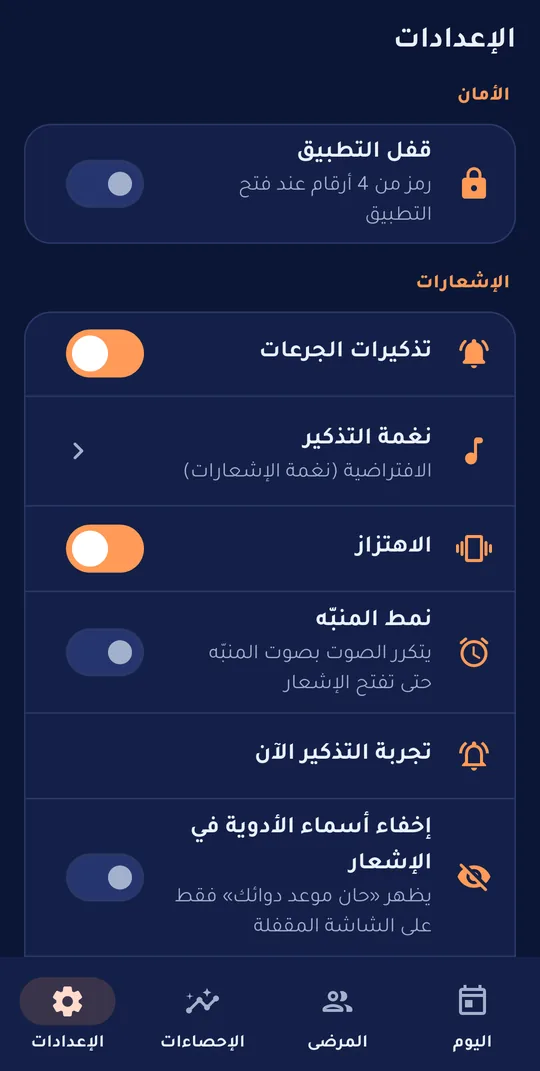
  • Your own sound: any tone on your phone, or silent, with vibration and an alarm style that repeats
  • The patient’s name never appears in the notification, and you can hide medicine names too
  • A home-screen widget with the next dose
  • A doctor-visit reminder an hour before
Reminder sound, vibration and alarm-style settings

Know your adherence and your stock

Stock drops with every dose, and you are warned before it runs out.

  • What is left in tablets or ml, and how many days it lasts
  • A warning when it drops below a week or your own limit
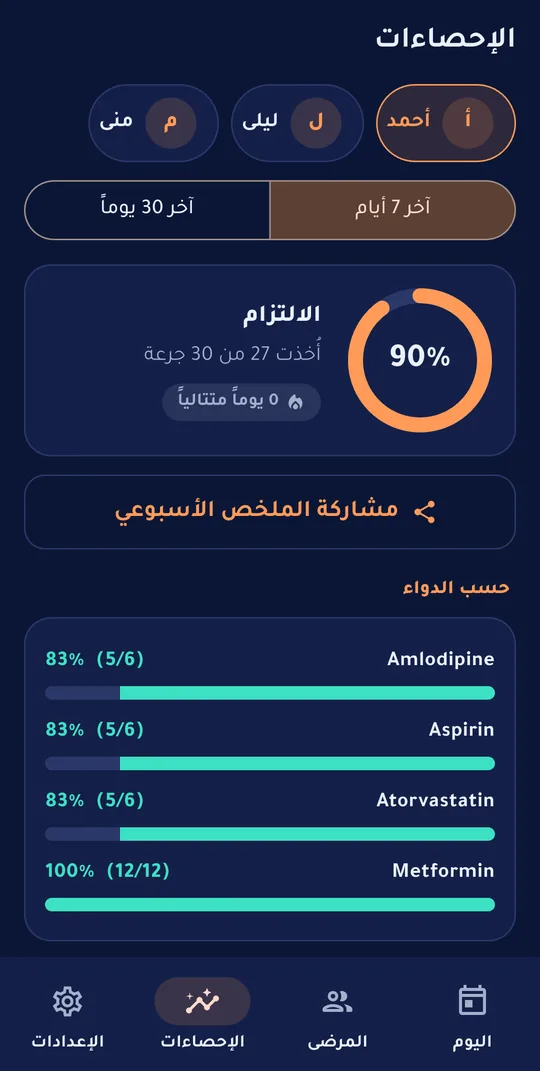
  • Adherence for 7 or 30 days, and per medicine
  • A streak of days with no missed dose
  • A weekly summary to share with your family
Stats: adherence, streak and adherence per medicine
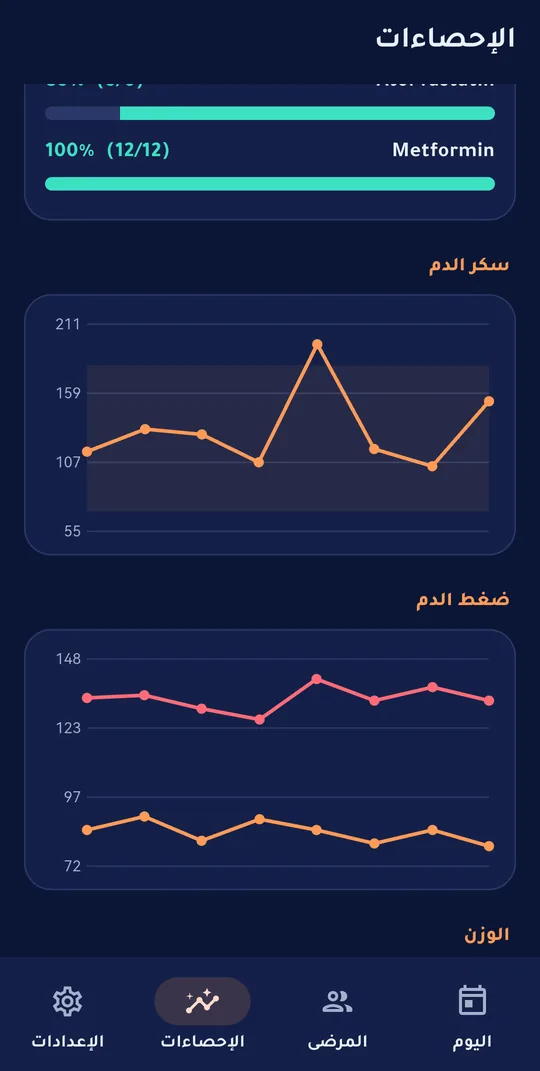
Glucose, pressure and weight charts

Your measurements and your safety

Log your readings, and notice what deserves attention.

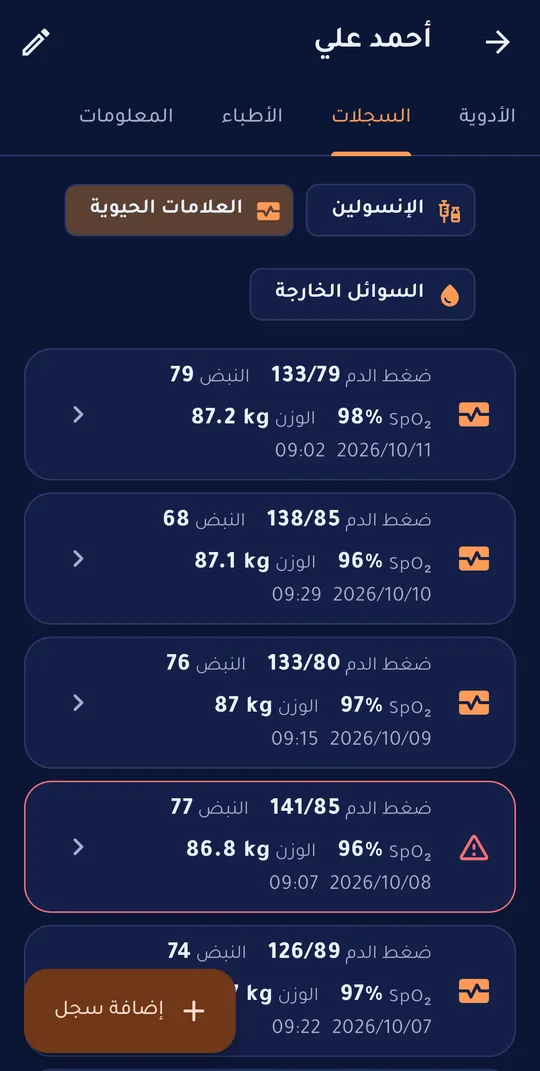
  • Blood glucose, insulin, pressure, pulse, temperature, oxygen, weight and fluids
  • Alert limits you or your doctor choose, with a warning when exceeded (the app does not diagnose)
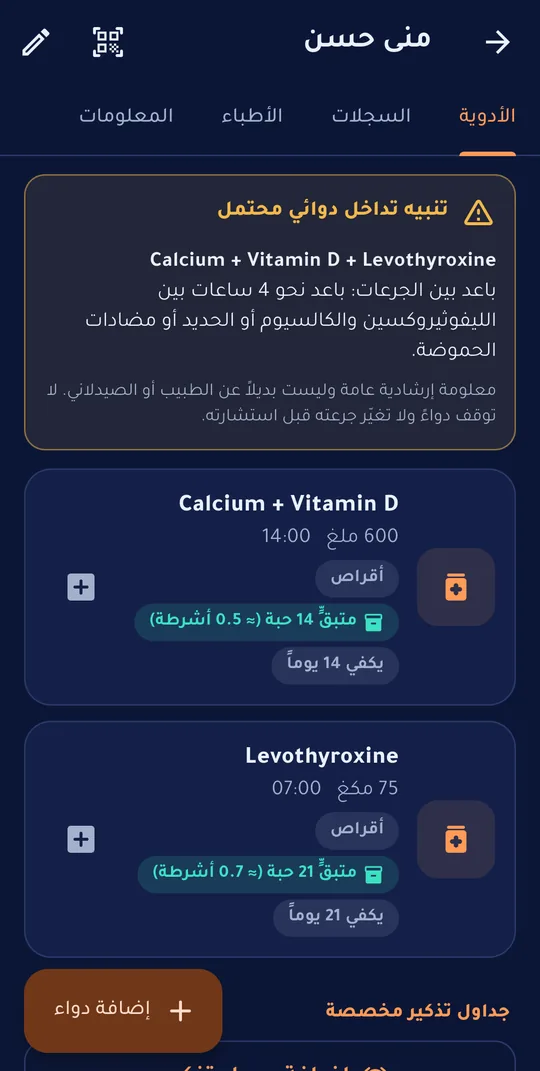
  • A warning for well-known drug interactions, as guidance and not a substitute for your doctor
  • An emergency card: blood type, allergies and a contact
  • Doctors and visits, and a PDF or CSV report for the doctor
Glucose, pressure and weight records with out-of-range values highlighted
A drug-interaction warning when adding a medicine

And more

Small details that make a difference every day.

  • PIN and fingerprint lock

    The app locks when you leave it, so nobody sees your health data.

  • Three languages

    Arabic, Central Kurdish and English, with a layout that follows reading direction.

  • A real trash

    Whatever you delete stays in the trash until you delete it for good yourself.

  • Encrypted backup

    Export your data to a file, encrypted with a passphrase if you like, plus a daily automatic copy on your phone.

  • Sync between your devices

    Optionally through your own Google Drive (the hidden app folder only), encrypted if you want.

  • Your family in one app

    Your parents, your children and you, each with their own medicines, records and stats.

Your health data is yours alone.

It stays on your device — this is not a policy, it is how the app is built.

  • No accounts or sign-up, and no health data is sent to our servers.
  • No ads, no trackers, no analytics.
  • The patient’s name never appears in notifications, and there is a PIN or fingerprint lock.
  • Optional sync to your own Google Drive only (the app’s hidden folder), encrypted with a passphrase if you wish.
Privacy policy

Installing on Android

The app is not on Google Play yet, so you install it from the APK file directly. It takes a minute.

  1. Download the file

    Tap “Download for Android” on your phone. The file is saved in your Downloads folder.

  2. Open the file

    From the download notification or the Files app, tap the Q DOSE file.

  3. Allow the install

    If an “install unknown apps” warning appears, tap Settings, allow installs from this source for your browser, then go back.

  4. Install and open

    Tap Install. If Play Protect warns you, choose “Install anyway” — the app has not been scanned because it is outside the store. It will ask for notification permission: allow it so reminders reach you.

Verify the file (optional)

The SHA-256 fingerprint of the original file — if it matches your file’s fingerprint, it is the same unmodified file:

cc8ded9ba8d994a6aea28854f7c8436b9f97195485c9157559cef2544c5b3780

Frequently asked questions

Is the app free?

Yes, completely: no subscription, no ads and no mandatory account.

Does it replace my doctor?

No. Q DOSE is a reminder and organising tool. Never change a dose or stop a medicine without medical advice; drug-interaction warnings are general guidance.

Does it work offline?

Yes, every feature and reminder works without a connection. The internet is used only if you turn on sync yourself, or to check for a new version (one request with no personal data).

How do I move my data to another phone?

Turn on sync with your Google account on both phones, or export a backup file (encrypted if you like) and import it on the new phone.

Do notifications work if I close the app?

Yes. If your phone stops background apps (some Huawei, Xiaomi and Samsung devices), allow the app to run in the background and to use exact alarms in the device settings.

How do I get updates?

The app tells you when a new version exists; download it from this page and install it over the old one — your data stays as it is.

Is it available on iPhone and Windows?

Coming soon: an iPhone version and a Windows version, plus Google Play. Message us and we will let you know when each is out.

Start now, free.

Add your first medicine and let Q DOSE remember for you.

Download for AndroidVersion 1.0.0 · 60 MB · APK file · Android 7.0+
Coming soon to
  • iPhone
  • Windows
  • Google Play

Q DOSE is a reminder and organising tool, not a substitute for a doctor or pharmacist.